Introduction
Finding an old email can feel frustrating. Your inbox fills up with work messages, shopping receipts, newsletters, and personal emails. After some time, it becomes hard to find the message you need. Many people spend several minutes searching through hundreds of emails. Luckily, Gmail has a smart feature that can make this job much easier. Gmail Search Operators are special commands that help you find emails in seconds.
You can search by sender, date, attachment, subject, and much more. Once you learn these simple tricks, managing your inbox becomes faster and less stressful. Whether you are a student, office worker, freelancer, or business owner, these search commands can save you a lot of time every day.
What Are Gmail Search Operators?
Gmail Search Operators are special words and commands used in Gmail’s search bar. They tell Gmail exactly what kind of email you want to find. Instead of searching through your whole inbox, you can narrow down the results and find specific messages quickly.
For example, you can search for emails from a certain person. You can also find messages with attachments, unread emails, or emails received during a certain time period. These commands work like filters and help remove unwanted results.
Many people do not know about these features. Because of that, they waste time scrolling through old messages. Learning these search tools can make your email experience much better and help you stay organized.
Why Gmail Search Operators Matter
Most people receive many emails every week. Some are important, while others are not. As your inbox grows, finding one message becomes harder.
This is where Gmail Search Operators become useful. They help you find emails faster and keep your inbox under control. Instead of checking every message one by one, you can use a simple command and get the exact result you need.
These search tools are useful for students, employees, online sellers, and business owners. They can help you find receipts, assignments, customer emails, and important documents without wasting time.
Good email management also reduces stress. When everything is easy to find, you can focus on your work instead of searching through a crowded inbox.
Most Popular Gmail Search Operators
There are many commands available in Gmail, but some are used more often than others.
Here are some popular ones:
- from: Finds emails from a specific sender.
- to: Finds emails sent to a certain person.
- subject: Searches words in the email subject.
- has:attachment: Shows emails with files attached.
- label: Searches emails inside a label.
- is:unread: Displays unread messages.
- is:starred: Finds starred emails.
- category: Searches emails by category.
These commands are simple to use. You can also combine them to get more accurate results.
How to Search Emails by Sender
One of the easiest ways to find an email is by searching for the sender. This method is very useful if you remember who sent the message but cannot remember the subject.
Simply type:
from@example.com
Gmail will show all emails from that address.
You can also search using a person’s name if they are saved in your contacts. This feature is useful for office work, customer support, and personal communication.
Searching by sender saves time and helps you find old conversations quickly.
Finding Emails with Attachments
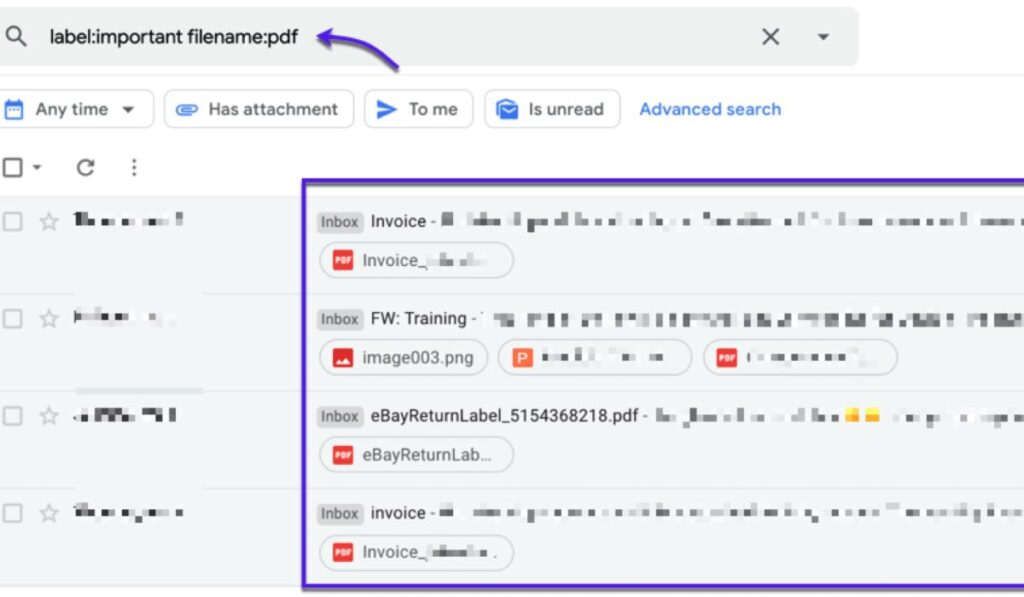
Attachments are often important. They may contain invoices, photos, reports, or contracts. Looking for these files manually can take a long time.
To find emails with files attached, type:
has
Gmail will show all messages that contain attachments.
You can make your search even better by combining commands. For example:
from@example.com has
This will display emails from that company that include files.
This feature is very helpful for people who receive many documents through email.
Search Emails by Date
Sometimes you remember when an email arrived, but you forget who sent it. Date filters can help in this situation.
You can search using:
- after:2025/01/01
- before:2025/12/31
These commands help you find emails from a certain period.
For example:
from@example.com after:2025/06/01
This search shows emails from your teacher after June 1, 2025.
Date searches are useful for keeping records and finding old messages quickly.
Combining Multiple Search Commands
One of the best things about Gmail Search Operators is that you can use several commands together.
For example:
from.com has is
This search shows unread emails from Amazon that contain attachments.
Another example is:
label after:2026/01/01
This will display work emails received after January 1, 2026.
Using multiple commands gives more accurate results. It also helps remove unwanted emails from the search results.
Hidden Features Many Users Miss
Most Gmail users only know basic searches. However, Gmail has many advanced commands that people often ignore.
Some examples include:
- older_than: Finds older emails.
- newer_than: Finds recent emails.
- filename: Searches for specific file types.
- larger: Finds large emails.
- smaller: Finds smaller emails.
These features are useful for cleaning your inbox and managing storage space.
Once you learn these hidden commands, you can use Gmail much more efficiently.
Tips for Using Gmail Search Operators
Learning Gmail Search Operators becomes easier with practice. Start with simple commands and slowly learn more advanced ones.
Here are some useful tips:
- Remember the commands you use most often.
- Combine commands for better results.
- Use date filters when searching old emails.
- Search attachments separately when needed.
- Organize emails with labels.
After some practice, searching your inbox will become quick and easy.
Conclusion
A busy inbox does not have to be difficult to manage. Gmail Search Operators make it easier to find emails, attachments, and important conversations. They save time and help keep your inbox organized.
Whether you use Gmail for school, work, or personal communication, these search commands can make your daily tasks much easier. Once you start using them regularly, you will wonder how you managed your inbox without them.
Frequently Asked Questions
1. What are Gmail Search Operators?
They are special commands used in Gmail’s search bar to find emails faster and more accurately.
2. Can beginners use Gmail Search Operators?
Yes. They are easy to learn and anyone can use them.
3. How can I find emails with attachments?
Type has in Gmail’s search bar to see emails that contain files.
4. Can I use more than one search command at the same time?
Yes. Combining commands gives more accurate results.
5. Are Gmail Search Operators useful for businesses?
Yes. Businesses use them to find customer emails, invoices, and important documents quickly.
Read More: AlsoAsked: The Smart Way to Find Questions People Search Online